Extend an Image's Background with AI
Keep your subject exactly as-is and let AI extend the background outward to fill any shape or size.
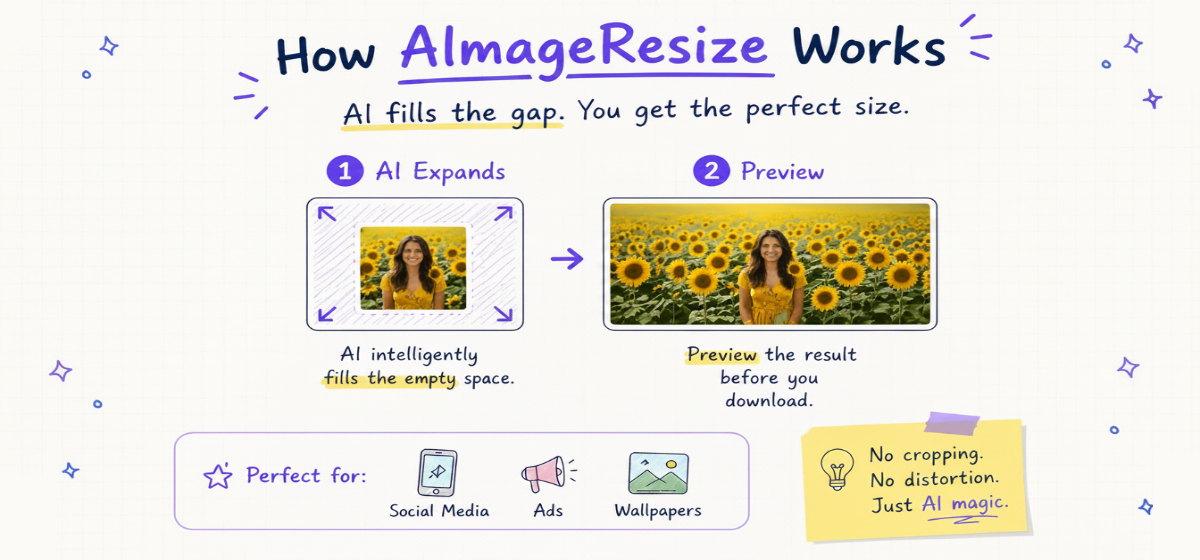
The problem
Your subject is perfect but the background runs out right at the edge — so the photo won't fit a wider banner, a taller story, or a layout that needs margin around the subject.
How it works
- 1Upload your image and pick the canvas size or aspect ratio you need.
- 2AI continues the existing background outward, matching color, lighting and texture.
- 3Your subject and original detail stay untouched in the center.
- 4Download the result with a seamlessly extended background.
What you can do with it
- Turn a portrait into a wide website header.
- Add margin around a product for clean e-commerce shots.
- Reformat photos for ads, slides and social without a reshoot.
- Fill the gaps when converting between aspect ratios.
Extend a background free
Sign in with Google and get 3 free AI generations. Credits never expire, no subscription.
Open the AI resizerFrequently asked questions
Sign in with Google and you get 3 free AI generations to try it. After that, credit packs start at $4.90 — credits never expire, and there's no subscription.
Yes — running the AI requires a free Google sign-in so we can give you your free credits and track your generations. Our other, non-AI image tools work without any login.
Your image is sent securely for processing and is not stored after your extend background result is delivered. We only keep your credit balance and usage count.
More AI image tools
Uncrop Image
Zoom out beyond the original frame. Our AI generates realistic new surroundings so your photo looks like it was always bigger.
Expand Image
Make an image bigger by adding new, AI-generated surroundings — not by stretching or upscaling pixels.
Change Aspect Ratio
Reframe any photo to a new aspect ratio — square, portrait, landscape — while AI generates the extra space instead of cutting your image.
Portrait to Landscape
Convert a vertical photo to horizontal by letting AI generate the left and right sides, so nothing gets cut off.